
2. Command Set
Streszczenie: Zestaw komend interfejsu ASCII: format wiadomości (adres węzła, kod komendy, parametry, znak <CR>), komendy s (zapis), g (odczyt), c (kopiowanie RAM↔flash), r (reset), t (generator trajektorii) oraz i (rejestry CVM) z przykładami odpowiedzi ok / v / e, a także adresowanie osi w napędach wieloosiowych.
EN: ASCII command set: message format, set/get/copy/reset/trajectory/register commands with examples, multi-axis addressing.
Dotyczy: serwonapędy Copley Controls z interfejsem ASCII (RS-232, sieć multi-drop CAN), program CME 2
Źródło: dokumentacja producenta (Copley Controls ASCII Interface Programmer’s Guide); tabele przepisane z obrazów na tekst – opracowanie Multiprojekt
2.1 Copley ASCII Message Format
The syntax of a Copley ASCII message is:
[<optional node ID>] <command code> [<command specific parameters>...] <CR>
where:
- [<optional node ID>] is the CAN node address of an amplifier in a multi-drop network. Range is 0 127. The node ID is followed by a single space.
- <command code> is the single-letter code for one of the Copley ASCII commands described below. It is followed by a single space, or, in the case of the Reset command, a carriage return character.
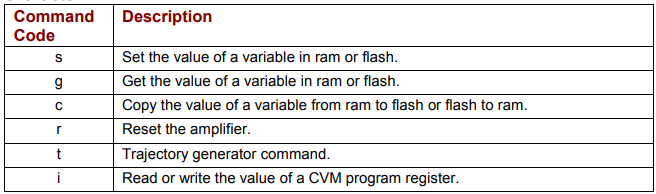
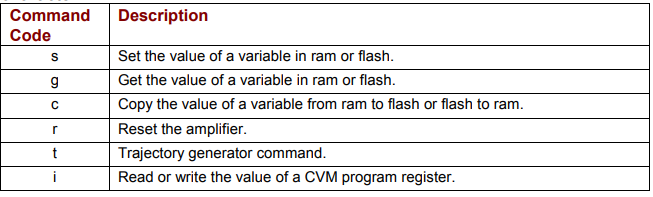
| Command Code | Description |
|---|---|
| s | Set the value of a variable in ram or flash. |
| g | Get the value of a variable in ram or flash. |
| c | Copy the value of a variable from ram to flash or flash to ram. |
| r | Reset the amplifier. |
| t | Trajectory generator command. |
| i | Read or write the value of a CVM program register. |
Original image of the table (from the PDF manual)
- <command specific parameters> tell the command what to act on and how. If more than one parameter is required, they should be separated by spaces.
- <cr> is a carriage return character that ends the command line.
For multi-axis amplifiers, see Copley ASCII Message Format for Multi-Axis Drives (p. 19).
2.2 Set (s) Command
The s command is used to set values of writeable amplifier variables.
The syntax of the s command is:
[ optional node ID] s <memory bank><variable ID> <value>...]<CR>
where:
- [optional node ID] is the CAN node address of an amplifier in a multi-drop network.
Range is 0-127. It is followed by a single space. - s is the Set command code. It is followed by a single space.
- <memory bank> identifies which memory bank to set the variable in.
f = flash memory
r = RAM memory - <variable ID> identifies the variable to set. Variable ID format can be decimal or hexadecimal.
- <value> is the new value(s) to be set in the variable. Value can be sent in integer or hexadecimal format. If multiple values are required, they are separated by spaces.
<CR> is a carriage return character which immediately follows the last value.
The amplifier responds to the s command with:
- ok<CR> if the command is accepted.
- e <error #><CR> if the command was not accepted. See Error Codes
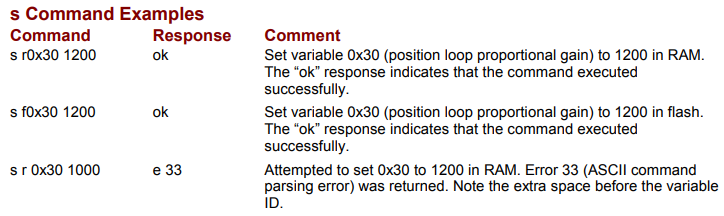
s Command Examples
| Command | Response | Comment |
|---|---|---|
| s r0x30 1200 | ok | Set variable 0x30 (position loop proportional gain) to 1200 in RAM. The "ok" response indicates that the command executed successfully. |
| s f0x30 1200 | ok | Set variable 0x30 (position loop proportional gain) to 1200 in flash. The "ok" response indicates that the command executed successfully. |
| s r 0x30 1000 | e 33 | Attempted to set 0x30 to 1200 in RAM. Error 33 (ASCII command parsing error) was returned. Note the extra space before the variable ID. |
Original image of the table (from the PDF manual)
2.3 Get (g) Command
The g command is used to get the values of amplifier variables.
The syntax of the g command is:
[ optional node ID] g <memory bank><variable ID><CR>
where:
- [optional node ID] is the CAN node address of an amplifier in a multi-drop network.
Range is 0-127. It is followed by a single space. - g is the Get command code. It is followed by a single space.
- <memory bank> identifies which memory bank to get the variable from.
f = flash memory
r = RAM memory - <variable ID> identifies the variable to get. Variable ID format can be decimal or hexadecimal.
- <CR> is a carriage return character which immediately follows the variable ID.
The amplifier responds to the Get command with:
- v [value]<CR> where value equals the contents of the variable. If the variable contains
multiple values, they will separated by spaces. - e <error #>(CR) if the command was not accepted. See Error Codes
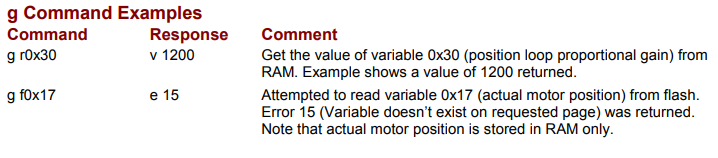
g Command Examples
| Command | Response | Comment |
|---|---|---|
| g r0x30 | v 1200 | Get the value of variable 0x30 (position loop proportional gain) from RAM. Example shows a value of 1200 returned. |
| g f0x17 | e 15 | Attempted to read variable 0x17 (actual motor position) from flash. Error 15 (Variable doesn’t exist on requested page) was returned. Note that actual motor position is stored in RAM only. |
Original image of the table (from the PDF manual)
2.4 Copy (c) Command
The c command is used to copy the value of a variable from one memory bank to another (RAM to flash or flash to RAM).
The syntax of the c command is:
[ optional node ID] c <memory bank><variable ID><CR>
where:
- [optional node ID] is the CAN node address of an amplifier in a multi-drop network.
Range is 0-127. It is followed by a single space. - c is the Copy command code. It is followed by a single space.
- <memory bank> identifies which memory bank is the source.
f = flash memory
r = RAM memory - <variable ID> identifies the variable to copy. Variable ID format can be decimal or
hexadecimal. - <CR> is a carriage return character which immediately follows the variable ID.
The amplifier responds to the c command with:
- ok<CR> if the command is accepted.
- e <error #>(CR) if the command was not accepted. See Error Codes
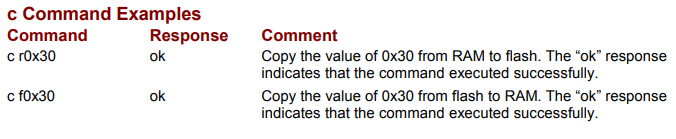
c Command Examples
| Command | Response | Comment |
|---|---|---|
| c r0x30 | ok | Copy the value of 0x30 from RAM to flash. The "ok" response indicates that the command executed successfully. |
| c f0x30 | ok | Copy the value of 0x30 from flash to RAM. The "ok" response indicates that the command executed successfully. |
Original image of the table (from the PDF manual)
2.5 Reset (r) Amplifier Command
The r command is used to immediately reset the amplifier. The command requires no additional parameters. The amplifier baud rate is set to 9600 when the amplifier restarts.
The syntax of the Reset command is:
[optional node ID] r<CR>
where:
- [optional node ID] is the CAN node address of an amplifier in a multi-drop network.
Range is 0-127. It is followed by a single space. - r is the Reset command code.
- <CR> is a carriage return character which immediately follows the command code.
The amplifier does not respond to the r command with an ASCII message.
r Command Example
| Command | Response | Comment |
|---|---|---|
| r | {none} | Amplifier is reset. |
Original image of the table (from the PDF manual)

NOTE: if a reset command is issued to an amplifier on a multi-drop network, error code 32, “CAN Network communications failure,” will be received. This is because the amplifier reset before responding to the gateway amplifier. This error can be safely ignored in this circumstance
2.6 Trajectory (t) Generator Command
The t command controls the trajectory generator. It can initiate a new move, update a move in progress, or start a home sequence. It can also abort a move.
The syntax of the t command is:
[ optional node ID] t <sub-command><CR>
where:
- [optional node ID] is the CAN node address of an amplifier in a multi-drop network.
Range is 0-127. It is followed by a single space. - t is the Trajectory command code. It is followed by a single space.
- <sub-command>
0 = Abort move
1 = Initiate/update move
2 = Initiate home sequence - <CR> is a carriage return character which immediately follows the sub-command. The amplifier responds to the t command with:
- ok<CR> if the command is accepted. An “ok” response only indicates the command was accepted by the amplifier. Monitor the trajectory status register to verify that motion has actually been initiated.
- e <error #>(CR) if the command was not accepted. See Error Codes
t Command Examples
| Command | Response | Comment |
|---|---|---|
| t 1 | ok | Initiate a move. |
| t2 | e 33 | Attempted to initiate a homing sequence. Error 33 (ASCII command parsing error) was returned. Note there is no space between the command and sub-command. |
Original image of the table (from the PDF manual)

2.7 Register (i) Read and Write Command
The Register command (i) is used to read and write the CVM program’s 32 internal registers.
The syntax of the i command is:
[ optional node ID] i <r#> [<value>]<CR>
where:
- [optional node ID] is the CAN node address of an amplifier in a multi-drop network.
Range is 0-127. It is followed by a single space. - i is the Register command code. It is followed by a single space.
- <r#> identifies which register is being accessed.
# = Equals the number of the register (0 – 31).
- <value> is the new value to be written into the register. If <value> is omitted from the command then the contents of the register will be returned. Value can be sent in integer or hexadecimal format.
- <CR> is a carriage return character which immediately follows the register number or the value.
The amplifier responds to the i command with:
- ok<CR> if the command is accepted and the value is written to the register.
- r [value]<CR> where value equals the contents of the register.
- e <error #>(CR) if the command was not accepted. See Error Codes
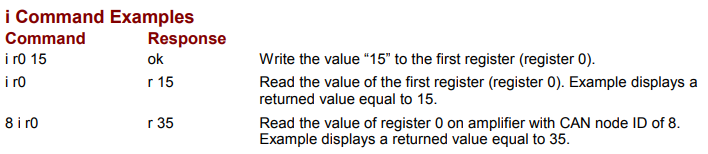
i Command Examples
| Command | Response | Comment |
|---|---|---|
| i r0 15 | ok | Write the value "15" to the first register (register 0). |
| i r0 | r 15 | Read the value of the first register (register 0). Example displays a returned value equal to 15. |
| 8 i r0 | r 35 | Read the value of register 0 on amplifier with CAN node ID of 8. Example displays a returned value equal to 35. |
Original image of the table (from the PDF manual)
2.8 Copley ASCII Message Format for Multi-Axis Drives
Some Copley Controls amplifiers can drive up to three axes of motion. When sending an ASCII command to an amplifier that is driving more than one axis, it is necessary to specify the axis as described below:
[<optional node ID>].<axis letter> <command code> [<command specific parameters>...] <CR>
where:
- [<optional node ID> ] is the CAN node address of an amplifier in a multi-drop network.
Range is 0-127. The node ID is followed by a period and the axis letter. - .<axis letter> specifies the axis (a, b, or c). The axis letter is preceded by a period and followed by a space.
- <command code> is the single-letter code for one of the Copley ASCII commands described below. It is followed by a single space, or, in the case of the Reset command, a carriage return character.
| Command Code | Description |
|---|---|
| s | Set the value of a variable in ram or flash. |
| g | Get the value of a variable in ram or flash. |
| c | Copy the value of a variable from ram to flash or flash to ram. |
| r | Reset the amplifier. |
| t | Trajectory generator command. |
| i | Read or write the value of a CVM program register. |
Original image of the table (from the PDF manual)
- <command specific parameters> tell the command what to act on and how. If more than one parameter is required, they should be separated by spaces.
- <cr> is a carriage return character that ends the command line
Multi-Axis Examples
| Command | Response | Comment |
|---|---|---|
| .b g r0x32 | v1200 | Get the value of variable 0x32 (Actual Motor Position) of axis b from RAM. Example shows a value of 1200 returned. |
| 2.c g r0x32 | v1200 | Get the value of variable 0x32 (Actual Motor Position) of Node 2, axis c from RAM. Example shows a value of 1200 returned. |
Original image of the table (from the PDF manual)

Słowa kluczowe
komendy ASCII, set, get, copy, reset, trajectory, s, g, c, r, t, i, node ID, adres węzła CAN, memory bank, odpowiedź ok, kod błędu, multi-axis, oś napędu