
Appendix A: CANopen Object
Streszczenie: Obiekt CANopenObj (CMLCOMLib.CANOpenObj): inicjalizacja sieci CANopen, licznik ramek błędów, prędkość transmisji (CML_BIT_RATES, 20 kbit/s – 1 Mbit/s) i nazwa portu karty CAN (Copley, Kvaser, National Instruments, Vector, IXXAT).
EN: The CANopen object: network initialization, error frame counter, bit rates and CAN card port names.
Dotyczy: Copley Motion Objects (CMO, biblioteka COM CMLCOMLib) – sterowanie serwonapędami Copley CANopen z PC (Windows; VB 6.0, VB .NET, LabVIEW)
Źródło: dokumentacja producenta (Copley Motion Objects Programmer’s Guide); tabele przepisane z obrazów na tekst – opracowanie Multiprojekt
This appendix describes the CANopen network object.
NOTE: Unless otherwise stated, all properties described in this appendix have read/write access. All methods return an HRESULT. In the event of an error, CMO reports the error in the form of COM-compatible error objects. See Error Handling
A.1:1 CANopen
All the methods and properties described below are members of CMLCOMLib.CANOpenObj
| Member | Description |
|---|---|
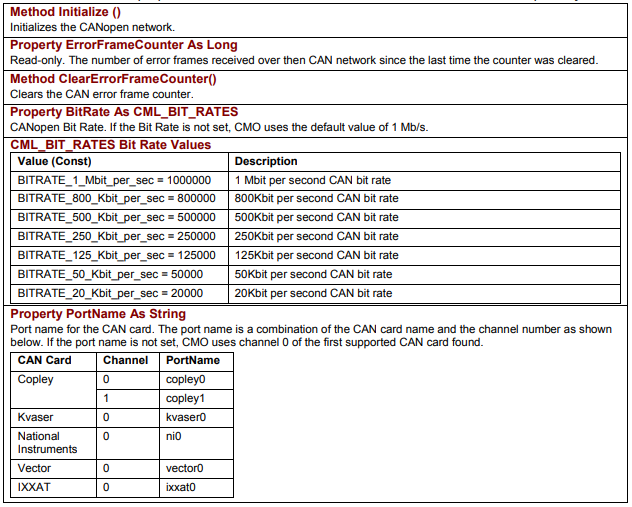
Method Initialize () | Initializes the CANopen network. |
Property ErrorFrameCounter As Long | Read-only. The number of error frames received over the CAN network since the last time the counter was cleared. |
Method ClearErrorFrameCounter() | Clears the CAN error frame counter. |
Property BitRate As CML_BIT_RATES | CANopen Bit Rate. If the Bit Rate is not set, CMO uses the default value of 1 Mb/s. |
CML_BIT_RATES Bit Rate Values
| Value (Const) | Description |
|---|---|
| BITRATE_1_Mbit_per_sec = 1000000 | 1 Mbit per second CAN bit rate |
| BITRATE_800_Kbit_per_sec = 800000 | 800Kbit per second CAN bit rate |
| BITRATE_500_Kbit_per_sec = 500000 | 500Kbit per second CAN bit rate |
| BITRATE_250_Kbit_per_sec = 250000 | 250Kbit per second CAN bit rate |
| BITRATE_125_Kbit_per_sec = 125000 | 125Kbit per second CAN bit rate |
| BITRATE_50_Kbit_per_sec = 50000 | 50Kbit per second CAN bit rate |
| BITRATE_20_Kbit_per_sec = 20000 | 20Kbit per second CAN bit rate |
| Member | Description |
|---|---|
Property PortName As String | Port name for the CAN card. The port name is a combination of the CAN card name and the channel number as shown below. If the port name is not set, CMO uses channel 0 of the first supported CAN card found. |
PortName values
| CAN Card | Channel | PortName |
|---|---|---|
| Copley | 0 | copley0 |
| Copley | 1 | copley1 |
| Kvaser | 0 | kvaser0 |
| National Instruments | 0 | ni0 |
| Vector | 0 | vector0 |
| IXXAT | 0 | ixxat0 |
Original image of the table (from the PDF manual)
Słowa kluczowe
CANopenObj, Initialize, BitRate, CML_BIT_RATES, PortName, ErrorFrameCounter, karta CAN, Kvaser, IXXAT, Vector, National Instruments