
Appendix B: Amplifier and Related Objects (B.1–B.10) – settings, information, motor, loops, tracking windows
Streszczenie: Obiekt wzmacniacza AmpObj, część 1: AmpSettingsObj (node guarding, heartbeat, SYNC, time stamp, reset/enable przy inicjalizacji), inicjalizacja napędu, informacje o napędzie (AmpInfoObj, typy wzmacniaczy), parametry silnika i sprzężenia zwrotnego (MotorInfoObj2: enkoder, hallotrony, hamulec), zapis i odczyt danych napędu, node guarding oraz pętle prądowa, prędkościowa i pozycyjna i okna śledzenia.
EN: Amplifier object part 1: settings, initialization, amplifier and motor information, save/restore, node guarding, current/velocity/position loops, tracking windows.
Dotyczy: Copley Motion Objects (CMO, biblioteka COM CMLCOMLib) – sterowanie serwonapędami Copley CANopen z PC (Windows; VB 6.0, VB .NET, LabVIEW)
Źródło: dokumentacja producenta (Copley Motion Objects Programmer’s Guide); tabele przepisane z obrazów na tekst – opracowanie Multiprojekt
This appendix details the amplifier object and other objects related to amplifier settings and status.
Note: Unless otherwise stated, all properties described in this appendix have read/write access. All methods return an HRESULT. In the event of an error, CMO reports the error in the form of COMcompatible error objects. See Error Handling
B.1 AmpSettingsObj
B.1.1 Overview
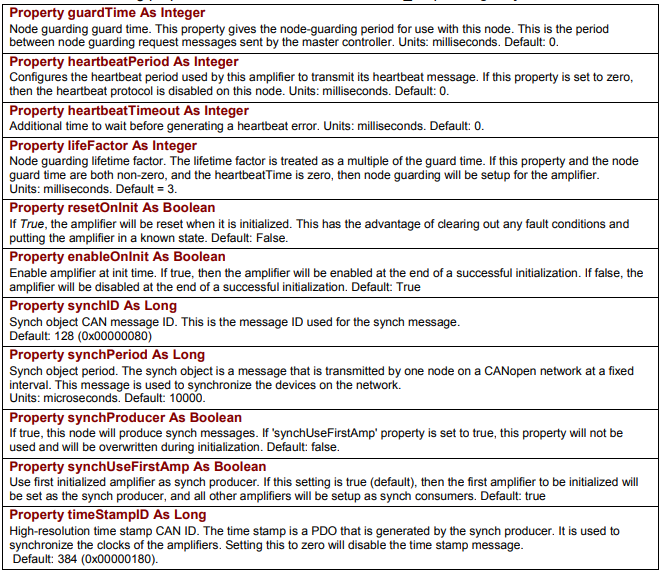
AmpSettingsObj contains information about the amplifier’s CANopen settings. All of the properties have both read and write access. The Amplifier Settings Object is used in the InitializeExt method of the Amplifier Object to customize the amplifier’s CANopen settings.
The basic steps for using the AmpSettingsObj are:
1 Declare an AmpSettingsObj.
2 Create a new instance of it.
3 Change one or more properties of the AmpSettingsObj.
4 Call AmpObj’s InitializeExt method and pass AmpSettingsObj as one of the parameters. See
InitializeExt.
B.1.2 AmpSettingsObj Methods and Properties
Each of the following properties is a member of CMLCOMLib_AmpSettingsObj
| Member | Description |
|---|---|
Property guardTime As Integer | Node guarding guard time. This property gives the node-guarding period for use with this node. This is the period between node guarding request messages sent by the master controller. Units: milliseconds. Default: 0. |
Property heartbeatPeriod As Integer | Configures the heartbeat period used by this amplifier to transmit its heartbeat message. If this property is set to zero, then the heartbeat protocol is disabled on this node. Units: milliseconds. Default: 0. |
Property heartbeatTimeout As Integer | Additional time to wait before generating a heartbeat error. Units: milliseconds. Default: 0. |
Property lifeFactor As Integer | Node guarding lifetime factor. The lifetime factor is treated as a multiple of the guard time. If this property and the node guard time are both non-zero, and the heartbeatTime is zero, then node guarding will be setup for the amplifier. Units: milliseconds. Default = 3. |
Property resetOnInit As Boolean | If True, the amplifier will be reset when it is initialized. This has the advantage of clearing out any fault conditions and putting the amplifier in a known state. Default: False. |
Property enableOnInit As Boolean | Enable amplifier at init time. If true, then the amplifier will be enabled at the end of a successful initialization. If false, the amplifier will be disabled at the end of a successful initialization. Default: True. |
Property synchID As Long | Synch object CAN message ID. This is the message ID used for the synch message. Default: 128 (0x00000080). |
Property synchPeriod As Long | Synch object period. The synch object is a message that is transmitted by one node on a CANopen network at a fixed interval. This message is used to synchronize the devices on the network. Units: microseconds. Default: 10000. |
Property synchProducer As Boolean | If true, this node will produce synch messages. If 'synchUseFirstAmp' property is set to true, this property will not be used and will be overwritten during initialization. Default: false. |
Property synchUseFirstAmp As Boolean | Use first initialized amplifier as synch producer. If this setting is true (default), then the first amplifier to be initialized will be set as the synch producer, and all other amplifiers will be setup as synch consumers. Default: true. |
Property timeStampID As Long | High-resolution time stamp CAN ID. The time stamp is a PDO that is generated by the synch producer. It is used to synchronize the clocks of the amplifiers. Setting this to zero will disable the time stamp message. Default: 384 (0x00000180). |
Original image of the table (from the PDF manual)
B.2 Amplifier Initialization
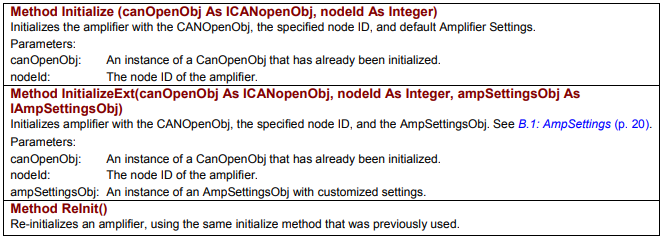
Each of these amplifier initialization methods is a member of CMLCOMLib.AmpObj.
| Member | Description |
|---|---|
Method Initialize (canOpenObj As ICANopenObj, nodeId As Integer) | Initializes the amplifier with the CANOpenObj, the specified node ID, and default Amplifier Settings. Parameters: canOpenObj – an instance of a CanOpenObj that has already been initialized; nodeId – the node ID of the amplifier. |
Method InitializeExt(canOpenObj As ICANopenObj, nodeId As Integer, ampSettingsObj As IAmpSettingsObj) | Initializes amplifier with the CANOpenObj, the specified node ID, and the AmpSettingsObj. See B.1: AmpSettings. Parameters: canOpenObj – an instance of a CanOpenObj that has already been initialized; nodeId – the node ID of the amplifier; ampSettingsObj – an instance of an AmpSettingsObj with customized settings. |
Method ReInit() | Re-initializes an amplifier, using the same initialize method that was previously used. |
Original image of the table (from the PDF manual)
B.3 Amplifier Information
B.3.1 Amplifier Information-Related Amplifier Object Properties
The following amplifier property is a member of CMLCOMLib.AmpObj.
Property AmpInfo As CMLCOMLib.AmpInfoObj
Read-only. Contains the AmpInfoObj. See Objects Contained by AmpObj (p. 12) and B.3.2 AmpInfoObj, below
B.3.2 AmpInfoObj
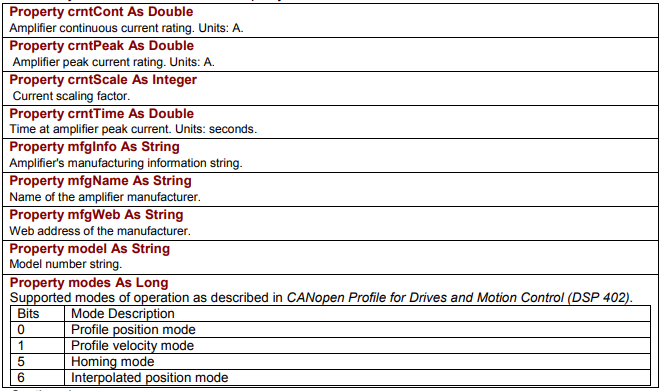
Each of the following Read-Only properties is a member of CMLCOMLib.AmpInfoObj. An instance of this object is obtained from the AmpObj.
| Member | Description |
|---|---|
Property crntCont As Double | Amplifier continuous current rating. Units: A. |
Property crntPeak As Double | Amplifier peak current rating. Units: A. |
Property crntScale As Integer | Current scaling factor. |
Property crntTime As Double | Time at amplifier peak current. Units: seconds. |
Property mfgInfo As String | Amplifier’s manufacturing information string. |
Property mfgName As String | Name of the amplifier manufacturer. |
Property mfgWeb As String | Web address of the manufacturer. |
Property model As String | Model number string. |
Property modes As Long | Supported modes of operation as described in CANopen Profile for Drives and Motion Control (DSP 402). Bits: 0 – Profile position mode; 1 – Profile velocity mode; 5 – Homing mode; 6 – Interpolated position mode. |
Original image of the table (from the PDF manual)
| Member | Description |
|---|---|
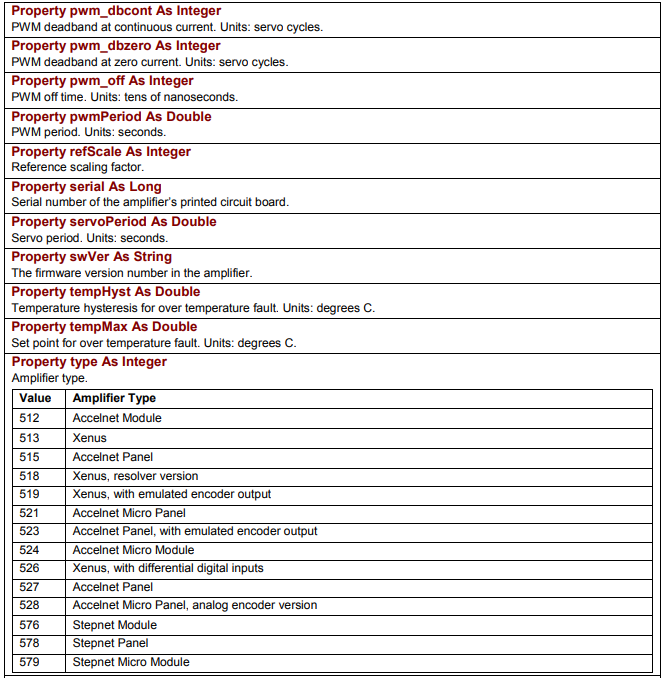
Property pwm_dbcont As Integer | PWM deadband at continuous current. Units: servo cycles. |
Property pwm_dbzero As Integer | PWM deadband at zero current. Units: servo cycles. |
Property pwm_off As Integer | PWM off time. Units: tens of nanoseconds. |
Property pwmPeriod As Double | PWM period. Units: seconds. |
Property refScale As Integer | Reference scaling factor. |
Property serial As Long | Serial number of the amplifier’s printed circuit board. |
Property servoPeriod As Double | Servo period. Units: seconds. |
Property swVer As String | The firmware version number in the amplifier. |
Property tempHyst As Double | Temperature hysteresis for over temperature fault. Units: degrees C. |
Property tempMax As Double | Set point for over temperature fault. Units: degrees C. |
Property type As Integer | Amplifier type – see the table below. |
Amplifier type values
| Value | Amplifier Type |
|---|---|
| 512 | Accelnet Module |
| 513 | Xenus |
| 515 | Accelnet Panel |
| 518 | Xenus, resolver version |
| 519 | Xenus, with emulated encoder output |
| 521 | Accelnet Micro Panel |
| 523 | Accelnet Panel, with emulated encoder output |
| 524 | Accelnet Micro Module |
| 526 | Xenus, with differential digital inputs |
| 527 | Accelnet Panel |
| 528 | Accelnet Micro Panel, analog encoder version |
| 576 | Stepnet Module |
| 578 | Stepnet Panel |
| 579 | Stepnet Micro Module |
Original image of the table (from the PDF manual)
| Member | Description |
|---|---|
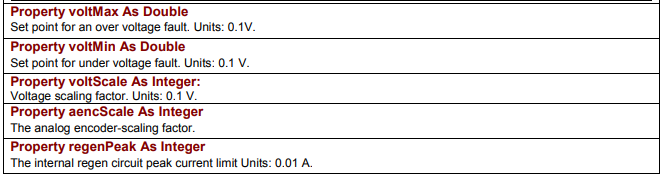
Property voltMax As Double | Set point for an over voltage fault. Units: 0.1V. |
Property voltMin As Double | Set point for under voltage fault. Units: 0.1 V. |
Property voltScale As Integer | Voltage scaling factor. Units: 0.1 V. |
Property aencScale As Integer | The analog encoder-scaling factor. |
Property regenPeak As Integer | The internal regen circuit peak current limit. Units: 0.01 A. |
Original image of the table (from the PDF manual)
| Member | Description |
|---|---|
Property regenCont As Integer | The internal regen circuit continuous current limit. Units: 0.01 A. |
Property regenTime As Integer | The internal regen circuit time at peak current. Units: milliseconds. |
Property voltHyst As Double | Bus voltage hysteresis for over voltage shutdown. Units: 0.1 Volts. |
Original image of the table (from the PDF manual)

B.4 Motor/Feedback Information
B.4.1 Motor/Feedback-Related Amplifier Object Methods and properties
Each of the following motor/feedback methods and properties is a member of CMLCOMLib.AmpObj.
| Member | Description |
|---|---|
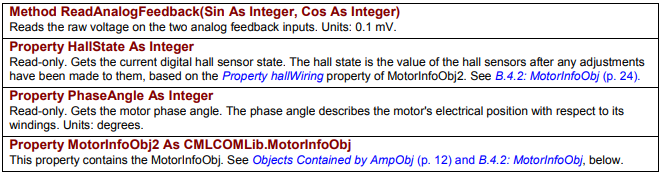
Method ReadAnalogFeedback(Sin As Integer, Cos As Integer) | Reads the raw voltage on the two analog feedback inputs. Units: 0.1 mV. |
Property HallState As Integer | Read-only. Gets the current digital hall sensor state. The hall state is the value of the hall sensors after any adjustments have been made to them, based on the hallWiring property of MotorInfoObj2. See B.4.2: MotorInfoObj. |
Property PhaseAngle As Integer | Read-only. Gets the motor phase angle. The phase angle describes the motor's electrical position with respect to its windings. Units: degrees. |
Property MotorInfoObj2 As CMLCOMLib.MotorInfoObj | This property contains the MotorInfoObj. See Objects Contained by AmpObj and B.4.2: MotorInfoObj, below. |
Original image of the table (from the PDF manual)
B.4.2 MotorInfoObj2
Each of the following Motor/Feedback properties is a member of CMLCOMLib.MotorInfoObj2. An
instance of this object is obtained from the AmpObj.
| Member | Description |
|---|---|
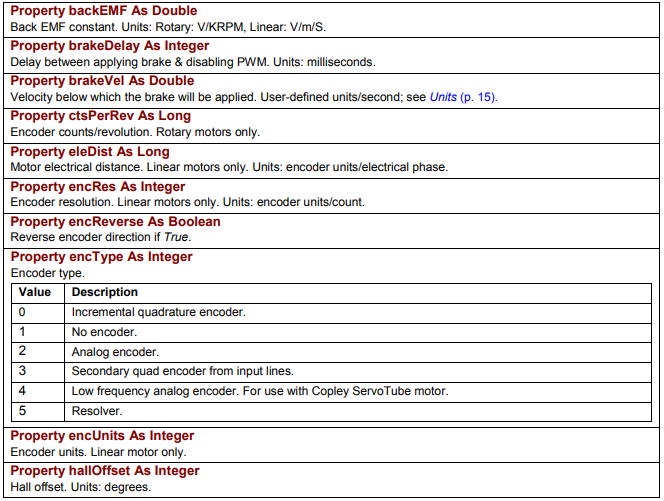
Property backEMF As Double | Back EMF constant. Units: Rotary: V/KRPM, Linear: V/m/S. |
Property brakeDelay As Integer | Delay between applying brake & disabling PWM. Units: milliseconds. |
Property brakeVel As Double | Velocity below which the brake will be applied. User-defined units/second; see Units. |
Property ctsPerRev As Long | Encoder counts/revolution. Rotary motors only. |
Property eleDist As Long | Motor electrical distance. Linear motors only. Units: encoder units/electrical phase. |
Property encRes As Integer | Encoder resolution. Linear motors only. Units: encoder units/count. |
Property encReverse As Boolean | Reverse encoder direction if True. |
Property encType As Integer | Encoder type – see the table below. |
encType values
| Value | Description |
|---|---|
| 0 | Incremental quadrature encoder. |
| 1 | No encoder. |
| 2 | Analog encoder. |
| 3 | Secondary quad encoder from input lines. |
| 4 | Low frequency analog encoder. For use with Copley ServoTube motor. |
| 5 | Resolver. |
| Member | Description |
|---|---|
Property encUnits As Integer | Encoder units. Linear motor only. |
Property hallOffset As Integer | Hall offset. Units: degrees. |
Original image of the table (from the PDF manual)
| Member | Description |
|---|---|
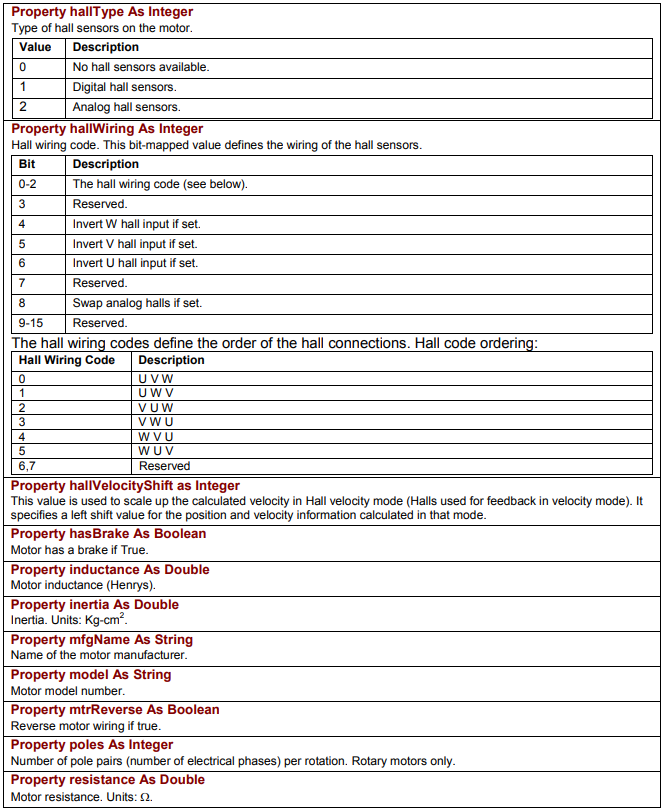
Property hallType As Integer | Type of hall sensors on the motor – see the table below. |
hallType values
| Value | Description |
|---|---|
| 0 | No hall sensors available. |
| 1 | Digital hall sensors. |
| 2 | Analog hall sensors. |
| Member | Description |
|---|---|
Property hallWiring As Integer | Hall wiring code. This bit-mapped value defines the wiring of the hall sensors – see the tables below. |
hallWiring bits
| Bit | Description |
|---|---|
| 0-2 | The hall wiring code (see below). |
| 3 | Reserved. |
| 4 | Invert W hall input if set. |
| 5 | Invert V hall input if set. |
| 6 | Invert U hall input if set. |
| 7 | Reserved. |
| 8 | Swap analog halls if set. |
| 9-15 | Reserved. |
Hall wiring codes – order of the hall connections
| Hall Wiring Code | Description |
|---|---|
| 0 | U V W |
| 1 | U W V |
| 2 | V U W |
| 3 | V W U |
| 4 | W V U |
| 5 | W U V |
| 6,7 | Reserved |
| Member | Description |
|---|---|
Property hallVelocityShift as Integer | This value is used to scale up the calculated velocity in Hall velocity mode (Halls used for feedback in velocity mode). It specifies a left shift value for the position and velocity information calculated in that mode. |
Property hasBrake As Boolean | Motor has a brake if True. |
Property inductance As Double | Motor inductance (Henrys). |
Property inertia As Double | Inertia. Units: Kg-cm². |
Property mfgName As String | Name of the motor manufacturer. |
Property model As String | Motor model number. |
Property mtrReverse As Boolean | Reverse motor wiring if true. |
Property poles As Integer | Number of pole pairs (number of electrical phases) per rotation. Rotary motors only. |
Property resistance As Double | Motor resistance. Units: Ω. |
Original image of the table (from the PDF manual)
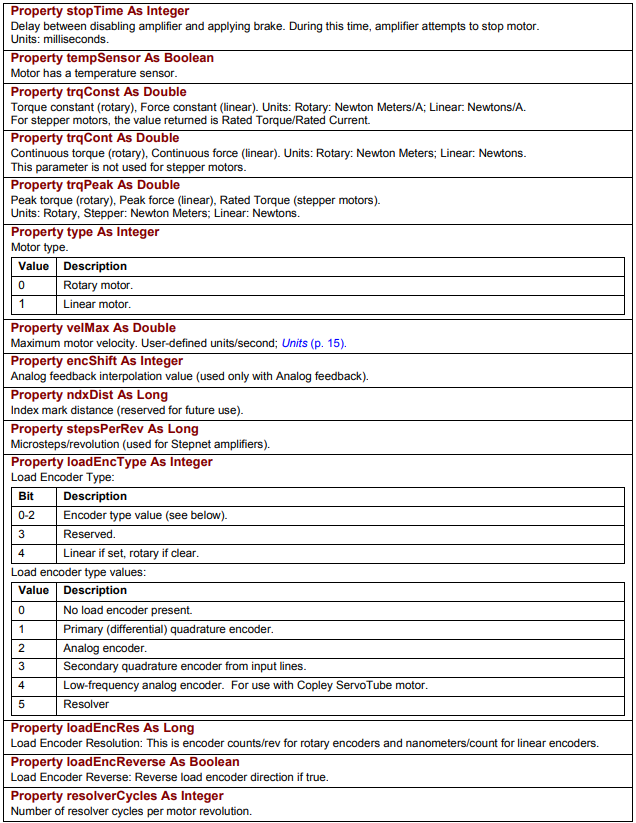
| Member | Description |
|---|---|
Property stopTime As Integer | Delay between disabling amplifier and applying brake. During this time, amplifier attempts to stop motor. Units: milliseconds. |
Property tempSensor As Boolean | Motor has a temperature sensor. |
Property trqConst As Double | Torque constant (rotary), Force constant (linear). Units: Rotary: Newton Meters/A; Linear: Newtons/A. For stepper motors, the value returned is Rated Torque/Rated Current. |
Property trqCont As Double | Continuous torque (rotary), Continuous force (linear). Units: Rotary: Newton Meters; Linear: Newtons. This parameter is not used for stepper motors. |
Property trqPeak As Double | Peak torque (rotary), Peak force (linear), Rated Torque (stepper motors). Units: Rotary, Stepper: Newton Meters; Linear: Newtons. |
Property type As Integer | Motor type: 0 = Rotary motor; 1 = Linear motor. |
Property velMax As Double | Maximum motor velocity. User-defined units/second; see Units. |
Property encShift As Integer | Analog feedback interpolation value (used only with Analog feedback). |
Property ndxDist As Long | Index mark distance (reserved for future use). |
Property stepsPerRev As Long | Microsteps/revolution (used for Stepnet amplifiers). |
Property loadEncType As Integer | Load Encoder Type – see the tables below. |
loadEncType bits
| Bit | Description |
|---|---|
| 0-2 | Encoder type value (see below). |
| 3 | Reserved. |
| 4 | Linear if set, rotary if clear. |
Load encoder type values
| Value | Description |
|---|---|
| 0 | No load encoder present. |
| 1 | Primary (differential) quadrature encoder. |
| 2 | Analog encoder. |
| 3 | Secondary quadrature encoder from input lines. |
| 4 | Low-frequency analog encoder. For use with Copley ServoTube motor. |
| 5 | Resolver. |
| Member | Description |
|---|---|
Property loadEncRes As Long | Load Encoder Resolution: This is encoder counts/rev for rotary encoders and nanometers/count for linear encoders. |
Property loadEncReverse As Boolean | Load Encoder Reverse: Reverse load encoder direction if true. |
Property resolverCycles As Integer | Number of resolver cycles per motor revolution. |
Original image of the table (from the PDF manual)
B.5 Save/Restore Amplifier Data
The following methods are used to save and restore amplifier data. They are members of CMLCOMLib.AmpObj
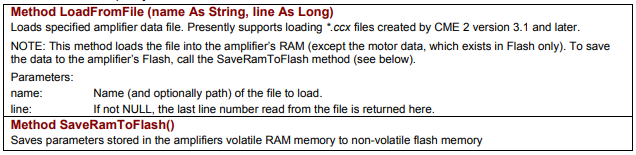
| Member | Description |
|---|---|
Method LoadFromFile (name As String, line As Long) | Loads specified amplifier data file. Presently supports loading *.ccx files created by CME 2 version 3.1 and later. NOTE: This method loads the file into the amplifier’s RAM (except the motor data, which exists in Flash only). To save the data to the amplifier’s Flash, call the SaveRamToFlash method (see below). Parameters: name – name (and optionally path) of the file to load; line – if not NULL, the last line number read from the file is returned here. |
Method SaveRamToFlash() | Saves parameters stored in the amplifiers volatile RAM memory to non-volatile flash memory. |
Original image of the table (from the PDF manual)
B.6 Node Guarding
The following methods, members of CMLCOMLib.AmpObj, are used to control node guarding.
| Member | Description |
|---|---|
Method StartGuarding(guardTime As Integer, lifeFactor As Integer) | Starts node guarding with the specified guard time and life factor. Units: time: milliseconds, lifeFactor: none. |
Method StopGuarding() | Disables node guarding & heartbeat monitoring. |
Method ClearNodeGuardEvent() | Attempts to clear a node guarding event condition. |
Original image of the table (from the PDF manual)

B.7 Current Loop
B.7.1 Current Loop-Related Amplifier Object Properties
The following current loop methods and properties are members of CMLCOMLib.AmpObj.
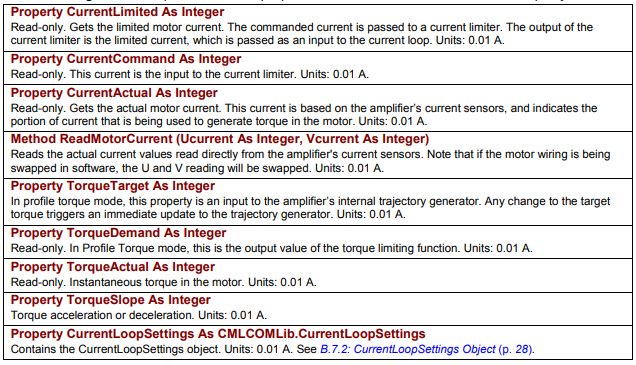
| Member | Description |
|---|---|
Property CurrentLimited As Integer | Read-only. Gets the limited motor current. The commanded current is passed to a current limiter. The output of the current limiter is the limited current, which is passed as an input to the current loop. Units: 0.01 A. |
Property CurrentCommand As Integer | Read-only. This current is the input to the current limiter. Units: 0.01 A. |
Property CurrentActual As Integer | Read-only. Gets the actual motor current. This current is based on the amplifier’s current sensors, and indicates the portion of current that is being used to generate torque in the motor. Units: 0.01 A. |
Method ReadMotorCurrent (Ucurrent As Integer, Vcurrent As Integer) | Reads the actual current values read directly from the amplifier's current sensors. Note that if the motor wiring is being swapped in software, the U and V reading will be swapped. Units: 0.01 A. |
Property TorqueTarget As Integer | In profile torque mode, this property is an input to the amplifier’s internal trajectory generator. Any change to the target torque triggers an immediate update to the trajectory generator. Units: 0.01 A. |
Property TorqueDemand As Integer | Read-only. In Profile Torque mode, this is the output value of the torque limiting function. Units: 0.01 A. |
Property TorqueActual As Integer | Read-only. Instantaneous torque in the motor. Units: 0.01 A. |
Property TorqueSlope As Integer | Torque acceleration or deceleration. Units: 0.01 A. |
Property CurrentLoopSettings As CMLCOMLib.CurrentLoopSettings | Contains the CurrentLoopSettings object. Units: 0.01 A. See B.7.2: CurrentLoopSettings Object. |
Original image of the table (from the PDF manual)
B.7.2 CurrentLoopSettings Object
The following current loop properties are members of CMLCOMLib. CurrentLoopSettings. An instance of this object is obtained from the AmpObj.
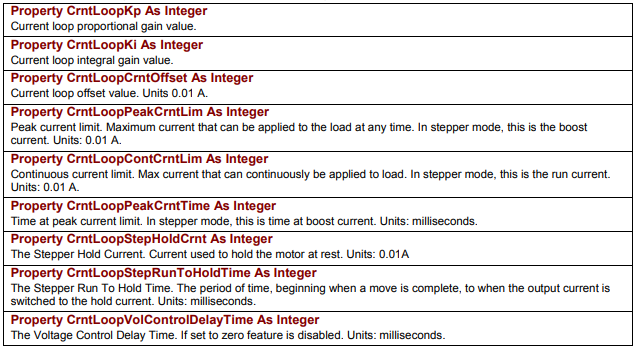
| Member | Description |
|---|---|
Property CrntLoopKp As Integer | Current loop proportional gain value. |
Property CrntLoopKi As Integer | Current loop integral gain value. |
Property CrntLoopCrntOffset As Integer | Current loop offset value. Units 0.01 A. |
Property CrntLoopPeakCrntLim As Integer | Peak current limit. Maximum current that can be applied to the load at any time. In stepper mode, this is the boost current. Units: 0.01 A. |
Property CrntLoopContCrntLim As Integer | Continuous current limit. Max current that can continuously be applied to load. In stepper mode, this is the run current. Units: 0.01 A. |
Property CrntLoopPeakCrntTime As Integer | Time at peak current limit. In stepper mode, this is time at boost current. Units: milliseconds. |
Property CrntLoopStepHoldCrnt As Integer | The Stepper Hold Current. Current used to hold the motor at rest. Units: 0.01A. |
Property CrntLoopStepRunToHoldTime As Integer | The Stepper Run To Hold Time. The period of time, beginning when a move is complete, to when the output current is switched to the hold current. Units: milliseconds. |
Property CrntLoopVolControlDelayTime As Integer | The Voltage Control Delay Time. If set to zero feature is disabled. Units: milliseconds. |
Original image of the table (from the PDF manual)
B.8 Velocity Loop
B.8.1 Velocity Loop-Related Amplifier Object Properties
The following velocity loop properties are members of CMLCOMLib.CML_AmpInfo.
| Member | Description |
|---|---|
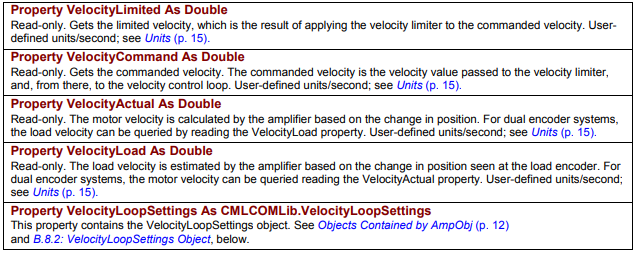
Property VelocityLimited As Double | Read-only. Gets the limited velocity, which is the result of applying the velocity limiter to the commanded velocity. User-defined units/second; see Units. |
Property VelocityCommand As Double | Read-only. Gets the commanded velocity. The commanded velocity is the velocity value passed to the velocity limiter, and, from there, to the velocity control loop. User-defined units/second; see Units. |
Property VelocityActual As Double | Read-only. The motor velocity is calculated by the amplifier based on the change in position. For dual encoder systems, the load velocity can be queried by reading the VelocityLoad property. User-defined units/second; see Units. |
Property VelocityLoad As Double | Read-only. The load velocity is estimated by the amplifier based on the change in position seen at the load encoder. For dual encoder systems, the motor velocity can be queried reading the VelocityActual property. User-defined units/second; see Units. |
Property VelocityLoopSettings As CMLCOMLib.VelocityLoopSettings | This property contains the VelocityLoopSettings object. See Objects Contained by AmpObj and B.8.2: VelocityLoopSettings Object, below. |
Original image of the table (from the PDF manual)
B.8.2 VelocityLoopSettings Object
The following velocity loop properties are members of CMLCOMLib. VelocityLoopSettings. An instance of this object is obtained from the AmpObj.
| Member | Description |
|---|---|
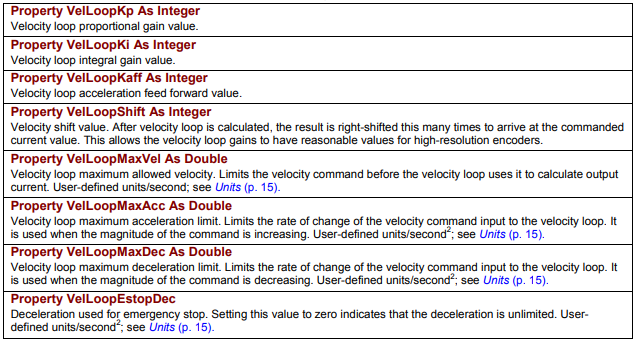
Property VelLoopKp As Integer | Velocity loop proportional gain value. |
Property VelLoopKi As Integer | Velocity loop integral gain value. |
Property VelLoopKaff As Integer | Velocity loop acceleration feed forward value. |
Property VelLoopShift As Integer | Velocity shift value. After velocity loop is calculated, the result is right-shifted this many times to arrive at the commanded current value. This allows the velocity loop gains to have reasonable values for high-resolution encoders. |
Property VelLoopMaxVel As Double | Velocity loop maximum allowed velocity. Limits the velocity command before the velocity loop uses it to calculate output current. User-defined units/second; see Units. |
Property VelLoopMaxAcc As Double | Velocity loop maximum acceleration limit. Limits the rate of change of the velocity command input to the velocity loop. It is used when the magnitude of the command is increasing. User-defined units/second²; see Units. |
Property VelLoopMaxDec As Double | Velocity loop maximum deceleration limit. Limits the rate of change of the velocity command input to the velocity loop. It is used when the magnitude of the command is decreasing. User-defined units/second²; see Units. |
Property VelLoopEstopDec | Deceleration used for emergency stop. Setting this value to zero indicates that the deceleration is unlimited. User-defined units/second²; see Units. |
Original image of the table (from the PDF manual)
B.9 Position Loop
B.9.1 Position Loop-Related Amplifier Object Properties
The following position loop properties are members of CMLCOMLib AmpObj.
| Member | Description |
|---|---|
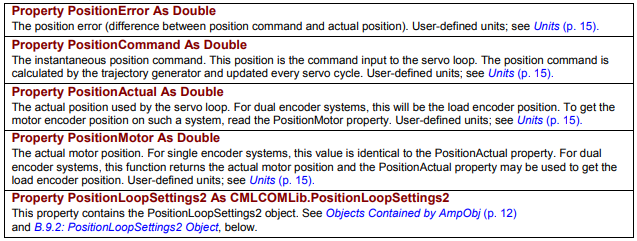
Property PositionError As Double | The position error (difference between position command and actual position). User-defined units; see Units. |
Property PositionCommand As Double | The instantaneous position command. This position is the command input to the servo loop. The position command is calculated by the trajectory generator and updated every servo cycle. User-defined units; see Units. |
Property PositionActual As Double | The actual position used by the servo loop. For dual encoder systems, this will be the load encoder position. To get the motor encoder position on such a system, read the PositionMotor property. User-defined units; see Units. |
Property PositionMotor As Double | The actual motor position. For single encoder systems, this value is identical to the PositionActual property. For dual encoder systems, this function returns the actual motor position and the PositionActual property may be used to get the load encoder position. User-defined units; see Units. |
Property PositionLoopSettings2 As CMLCOMLib.PositionLoopSettings2 | This property contains the PositionLoopSettings2 object. See Objects Contained by AmpObj and B.9.2: PositionLoopSettings2 Object, below. |
Original image of the table (from the PDF manual)
B.9.2 PositionLoopSettings2 Object
The following position loop properties are members of CMLCOMLib. PositionLoopSettings2. An instance of this object is obtained from the AmpObj.
| Member | Description |
|---|---|
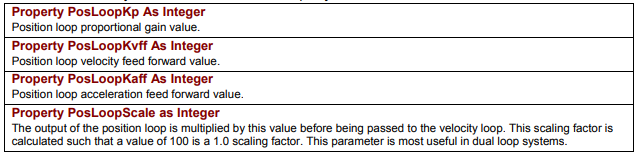
Property PosLoopKp As Integer | Position loop proportional gain value. |
Property PosLoopKvff As Integer | Position loop velocity feed forward value. |
Property PosLoopKaff As Integer | Position loop acceleration feed forward value. |
Property PosLoopScale as Integer | The output of the position loop is multiplied by this value before being passed to the velocity loop. This scaling factor is calculated such that a value of 100 is a 1.0 scaling factor. This parameter is most useful in dual loop systems. |
Original image of the table (from the PDF manual)
B.10 Tracking Windows
B.10.1 Tracking Windows - Related Amplifier Object Properties
The following amplifier property is a member of CMLCOMLib.AmpObj.
Property TrackingWindows As CMLCOMLib.TrackingWindows
This property contains the TrackingWindows object. See Objects Contained by AmpObj and B.10.2 TackingWindows Object, below.
B.10.2 TackingWindows Object
Each of the following Amplifier Settings is a member of CMLCOMLib.TrackingWindows. An instance of this object is obtained from the AmpObj.
| Member | Description |
|---|---|
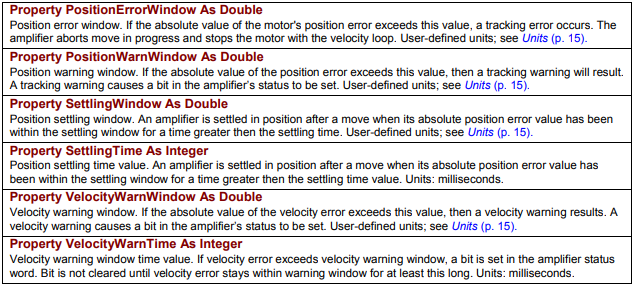
Property PositionErrorWindow As Double | Position error window. If the absolute value of the motor's position error exceeds this value, a tracking error occurs. The amplifier aborts move in progress and stops the motor with the velocity loop. User-defined units; see Units. |
Property PositionWarnWindow As Double | Position warning window. If the absolute value of the position error exceeds this value, then a tracking warning will result. A tracking warning causes a bit in the amplifier’s status to be set. User-defined units; see Units. |
Property SettlingWindow As Double | Position settling window. An amplifier is settled in position after a move when its absolute position error value has been within the settling window for a time greater then the settling time. User-defined units; see Units. |
Property SettlingTime As Integer | Position settling time value. An amplifier is settled in position after a move when its absolute position error value has been within the settling window for a time greater then the settling time value. Units: milliseconds. |
Property VelocityWarnWindow As Double | Velocity warning window. If the absolute value of the velocity error exceeds this value, then a velocity warning results. A velocity warning causes a bit in the amplifier’s status to be set. User-defined units; see Units. |
Property VelocityWarnTime As Integer | Velocity warning window time value. If velocity error exceeds velocity warning window, a bit is set in the amplifier status word. Bit is not cleared until velocity error stays within warning window for at least this long. Units: milliseconds. |
Original image of the table (from the PDF manual)
Słowa kluczowe
AmpObj, AmpSettingsObj, InitializeExt, AmpInfoObj, MotorInfoObj2, encType, hallType, hallWiring, LoadFromFile, SaveRamToFlash, StartGuarding, CurrentLoopSettings, VelocityLoopSettings, PositionLoopSettings2, TrackingWindows, PositionErrorWindow