
Appendix D: The Event Object
Streszczenie: Obiekt EventObj do monitorowania zdarzeń napędów, osi powiązanych i modułów I/O: tworzenie (CreateEvent), metody Start/Stop/Wait, callback EventNotify oraz warunki zdarzeń (ANY/ALL/NONE).
EN: The Event object: creating event monitors, Start/Stop/Wait, EventNotify callback and event conditions.
Dotyczy: Copley Motion Objects (CMO, biblioteka COM CMLCOMLib) – sterowanie serwonapędami Copley CANopen z PC (Windows; VB 6.0, VB .NET, LabVIEW)
Źródło: dokumentacja producenta (Copley Motion Objects Programmer’s Guide); tabele przepisane z obrazów na tekst – opracowanie Multiprojekt
This appendix describes the use of the Event Object.
Note: All methods return an HRESULT. In the event of an error, CMO reports the error in the form of COM-compatible error objects. See Error Handling
D.1:1 Event Object
D.1.1:1 Overview
The EventObj allows an application program to be event-driven by having a procedure called when an event occurs in the amplifier. This allows the application program to continue execution while waiting for an event to occur. That is, the program is not blocked. For example, EventObj could call a procedure when a move is done, to perform some action such as performing the next move. The
Event Object can be set up to perform a callback on a one-time basis or repeatedly. The EventObj is used in conjunction with the CMO objects that support events: AmpObj, LinkageObj, and IOObj.
The CreateEvent method associated with each these three objects sets up the event monitor and returns an instance of the EventObj. See the following descriptions:
| CreateEvent Method for: | See: |
|---|---|
| AmpObj | CreateEvent (Appendix B, AmpObj) |
| LinkageObj | CreateEvent (Appendix C, LinkageObj) |
| IOObj | CreateEvent (Appendix E, IOObj) |
Original image of the table (from the PDF manual)

D.1.2:2 Event Object Methods
All of the Methods described here are members of CMLCOMLib.EventObj
| Member | Description |
|---|---|
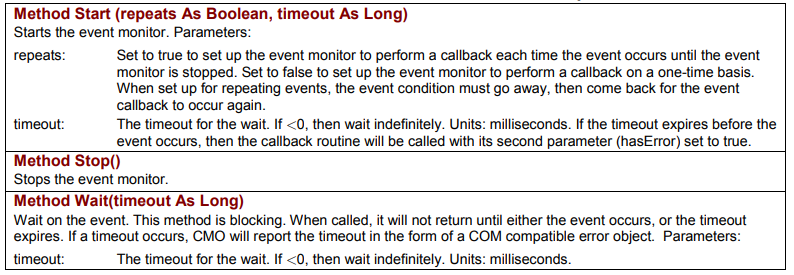
Method Start (repeats As Boolean, timeout As Long) | Starts the event monitor. Parameters: repeats – set to true to set up the event monitor to perform a callback each time the event occurs until the event monitor is stopped; set to false to set up the event monitor to perform a callback on a one-time basis. When set up for repeating events, the event condition must go away, then come back for the event callback to occur again; timeout – the timeout for the wait. If <0, then wait indefinitely. Units: milliseconds. If the timeout expires before the event occurs, then the callback routine will be called with its second parameter (hasError) set to true. |
Method Stop() | Stops the event monitor. |
Method Wait(timeout As Long) | Wait on the event. This method is blocking. When called, it will not return until either the event occurs, or the timeout expires. If a timeout occurs, CMO will report the timeout in the form of a COM compatible error object. Parameters: timeout – the timeout for the wait. If <0, then wait indefinitely. Units: milliseconds. |
Original image of the table (from the PDF manual)
D.1.3:3 Callback Method
EventNotify is a member of CMLCOMLib.EventObj
| Member | Description |
|---|---|
Event EventNotify(match As CML_AMP_EVENT, timeout As Boolean) | Returns the contents of the register that was set up to trigger the event. The timeout variable will be true if the timeout period expired. Parameters: match – the contents of the register that was set up to trigger the event; timeout – True if a timeout or error occurred, False otherwise. Should be checked for an error condition before processing the event handling code. |
Original image of the table (from the PDF manual)

D.1.4:4 Event Conditions
Each of the following is a member of CMLCOMLib.CML_EVENT_CONDITION. Used to select the event triggering condition.
Event Conditions (CML_EVENT_CONDITION)
| Const | Description |
|---|---|
| CML_EVENT_ANY = 1 | Any event occurring. |
| CML_EVENT_ALL = 2 | All the events are required. |
| CML_EVENT_NONE = 3 | None of the events. |
Original image of the table (from the PDF manual)

Słowa kluczowe
EventObj, CreateEvent, Start, Stop, Wait, EventNotify, callback, CML_EVENT_CONDITION, CML_EVENT_ANY, CML_EVENT_ALL