
7. Troubleshooting
Streszczenie: Rozwiązywanie problemów: diagnoza na podstawie diod LED (przyczyny i działania) oraz lista kontrolna, gdy urządzenie nie komunikuje się z siecią – okablowanie, rezystor terminujący, adres węzła, konfiguracja mastera, uziemienie i warunki otoczenia.
EN: Troubleshooting: LED-based diagnosis and a checklist when the device cannot communicate.
Dotyczy: adapter sieciowy CREVIS NA-9473 (MODBUS RTU/ASCII, RS-485) systemu FnIO z modułami rozszerzeń serii ST
Źródło: dokumentacja producenta (CREVIS NA-9473 MODBUS Adapter (RS-485) User Manual); tabele przepisane z obrazów na tekst – opracowanie Multiprojekt
7.1.1 How to diagnose by LED indicator
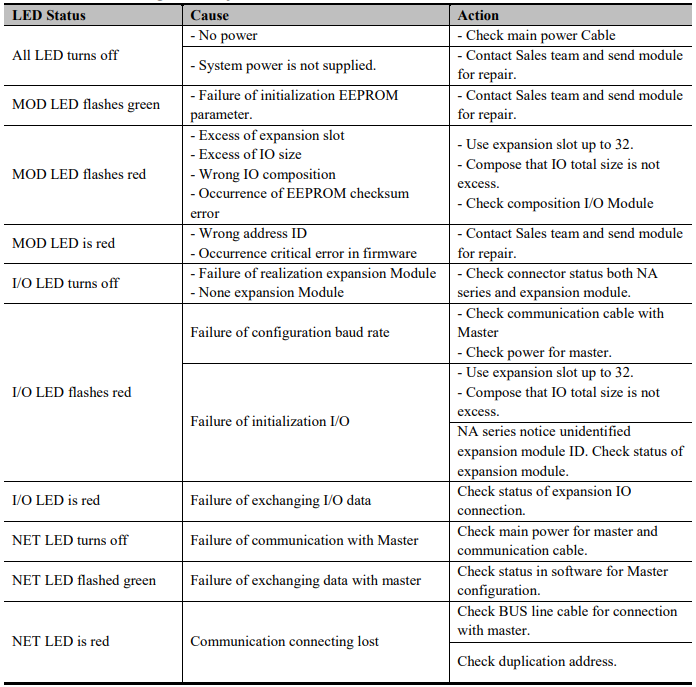
Diagnosis by LED indicator
| LED Status | Cause | Action |
|---|---|---|
| All LEDs turn off | No power. | Check main power cable. |
| All LEDs turn off | System power is not supplied. | Contact sales team and send module for repair. |
| MOD LED flashes green | Failure of initialization EEPROM parameter. | Contact sales team and send module for repair. |
| MOD LED flashes red | Excess of expansion slots; excess of IO size; wrong IO composition; occurrence of EEPROM checksum error. | Use expansion slots up to 32; compose so that IO total size is not exceeded; check composition of I/O modules. |
| MOD LED is red | Wrong address ID; occurrence of critical error in firmware. | Contact sales team and send module for repair. |
| I/O LED turns off | Failure of realization of expansion module; no expansion module. | Check connector status of both NA series and expansion module. |
| I/O LED flashes red | Failure of configuration baud rate. | Check communication cable with master; check power for master. |
| I/O LED flashes red | Failure of initialization I/O. | Use expansion slots up to 32; compose so that IO total size is not exceeded. / NA series notices unidentified expansion module ID – check status of expansion module. |
| I/O LED is red | Failure of exchanging I/O data. | Check status of expansion IO connection. |
| NET LED turns off | Failure of communication with master. | Check main power for master and communication cable. |
| NET LED flashes green | Failure of exchanging data with master. | Check status in software for master configuration. |
| NET LED is red | Communication connection lost. | Check bus line cable for connection with master; check duplicate address. |
7.2.2 How to diagnose when device couldn’t communicate network
Inspection of wrong or omission cable connection.
-connection
- Check status of cable connection for each node.
- - Check that all color matches between connector and cable.
- - Check wire omission.
Terminator resistor
-
- If terminator resistor is not installed, install terminator resistor
- - Check location of terminator resistor
Configuration of Node address
-
- Check duplication node address.
Configuration of Master
-
- Check configuration of master
- - Check whether to do download or don’t
- - Check composition is
rightConfigurationright:- configuration of communication baud rate
- I/O size
Configuration - configuration of each node
- configuration of communication baud rate
Ground and environment
-
- Check ground is contacted
- - Check environment factor (temperature, humidity, etc.) is in less than regular limit
Słowa kluczowe
diagnostyka, diody LED, brak komunikacji, okablowanie, terminator, adres węzła, master, uziemienie