
10. Device Maintenance
Streszczenie: Konserwacja czytnika ID3000: aktualizacja firmware z poziomu klienta IDMVS i ponowne uruchomienie urządzenia.
EN: ID3000 maintenance: firmware update via the IDMVS client and device reboot.
Dotyczy: przemysłowy czytnik kodów Hikrobot serii ID3000 (złącze M12 17-pin, Fast Ethernet, RS-232; obsługa przez klienta IDMVS)
Źródło: dokumentacja producenta (Hikrobot ID3000 Series Industrial Code Reader User Manual, V3.1.0); opisy rysunków – opracowanie Multiprojekt
10.1 Update Firmware
The device supports updating firmware via the client software.

- Disconnect the device from the client software.
- Use the firmware package of the corresponding device model for upgrading.
- Do not power off the device or disconnect the network during upgrading.
- The device will reboot automatically after updating the firmware.
Select the device to be updated in the device list, right click the device, and click Firmware Update. Click 
 to select update file from local PC, and click Update to update firmware.

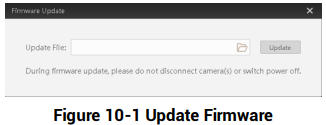
Figure 10-1 Update Firmware
Figure description (text version): Firmware Update dialog: Update File field with a browse button and an Update button; warning text "During firmware update, please do not disconnect camera(s) or switch power off".
10.2 Reboot Device
You can reboot the device via client software in 2 ways. Go to Config Management, and click Restart Device. Or, you can select the device to be rebooted in the device list, right click the device, and click Device Reset.
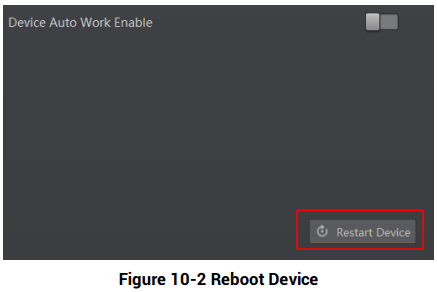
Figure 10-2 Reboot Device
Figure description (text version): Config Management panel with Device Auto Work Enable (off) and the Restart Device button highlighted in red at the bottom right.
Słowa kluczowe
Hikrobot ID3000, firmware update, aktualizacja, Firmware Updater, reboot, restart device, device reset, konserwacja