
7. Device Mode Settings
Streszczenie: Tryby pracy czytnika ID5000 (Test, Normal, Raw), wybór trybu w oknie podglądu na żywo oraz podgląd efektu odczytu kodów.
EN: ID5000 device modes (Test, Normal, Raw), selecting the mode in the live view window and previewing the code reading effect.
Dotyczy: przemysłowy czytnik kodów Hikrobot serii ID5000 (złącze M12 12-pin, Gigabit Ethernet, RS-232; obsługa przez klienta IDMVS)
Źródło: dokumentacja producenta (Hikrobot ID5000 Series Industrial Code Reader User Manual, V2.5.0); tabele i uwagi przepisane z obrazów na tekst; opisy rysunków – opracowanie Multiprojekt
The device supports 3 types of operating modes, including Test, Normal, and Raw. You can select different modes in live view window according to actual demands.
Device Modes
Note:
- Stopping the real-time acquisition is required before selecting modes.
- You need to set device mode as Normal before specific device settings. Otherwise, the device parameters may be different.
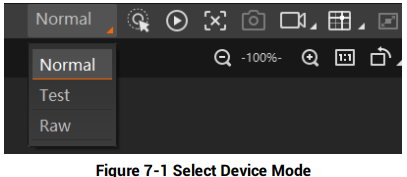
Figure 7-1 Select Device Mode
Figure description (text version): Live view toolbar with the mode drop-down list expanded at the top left (Normal selected, Test, Raw), followed by acquisition, capture, recording and layout buttons.
Table 7-1 Device Mode Description
| Device Mode | Description |
|---|---|
| Test Mode | It is used during device debugging. The device outputs images that are acquired in real-time, and displays code information. |
| Normal Mode | It is used during device normal operation. After reading code in image, the device outputs image and code information. |
| Raw Mode | It is used during testing image data. The device outputs raw data and displays code information. |
Code Reading Preview
You can click  in the live view window to view images and the code reading effect. If the effect is not very good, you can adjust related parameters like exposure time, gain, Gamma, etc. in Image Settings area.
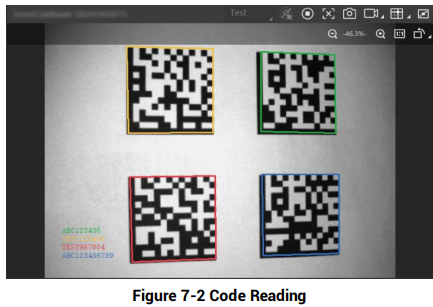
Figure 7-2 Code Reading
Figure description (text version): Live view window in Test mode: four DataMatrix codes, each framed in a different colour (yellow, green, red, blue); the read results are listed in matching colours in the lower left corner.
Słowa kluczowe
Hikrobot ID5000, device mode, Test mode, Normal mode, Raw mode, tryb pracy, live view, code reading