
Zmiana modelu HMI w projekcie
Streszczenie: Zmiana modelu HMI w istniejącym projekcie EasyBuilder Pro (np. MT8070iE 800×480 na eMT3120 1024×768): [Edit] » [System Parameters] » [Model] i wybór skalowania okien i obiektów do nowej rozdzielczości.
EN: How to change the target HMI model of an EasyBuilder Pro project and resize windows and objects to the new resolution.
Dotyczy: EasyBuilder Pro; przykład MT8070iE → eMT3120
Źródło: Weintek FAQ (materiały producenta), oryginalny tytuł: „Change Model of Project”
The following example shows how to change a MT8070iE (800 x 480) project to an eMT3120 (1024 x 768) project.
Step 1. Open the MT8070iE project.
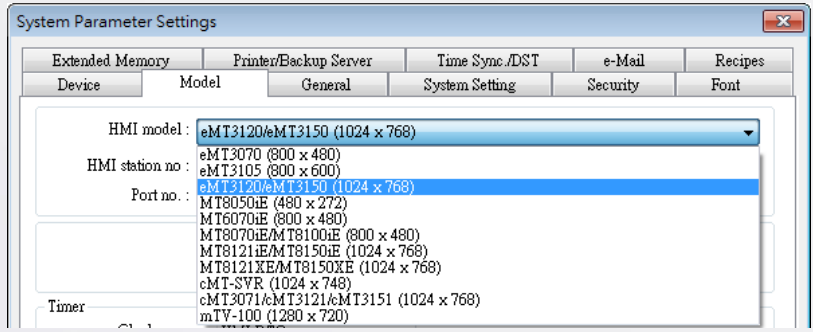
Step 2. Click [Edit] button » select [System Parameters] » [Model] tab » select [eMT3120/eMT3150 (1024 x 768)]
Step 3. After click [OK], the “Resize pop-up windows/objects” dialog box will be displayed, please selected the needed settings. For example, if [Resize objects] check box is selected, the objects will be resized according to the screen size of the new model.
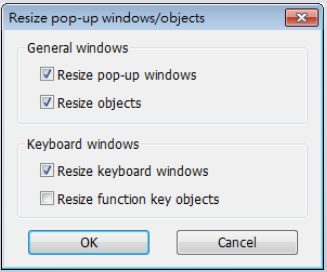
Step 4. Click [OK] to complete the process. Now you will see the eMT3120 (1024 x 768) project.
Słowa kluczowe
zmiana modelu, change model, System Parameters, Model, rozdzielczość, Resize objects, skalowanie obiektów, MT8070iE, eMT3120, eMT3150, EasyBuilder Pro, Change Model of Project
No comments to display
No comments to display