
13. Homing
Streszczenie: Ekran Homing: ustawienie parametrów bazowania (limity programowe, metoda, prędkości, przyspieszenie, offset), uruchomienie testowego bazowania i zapis do pamięci flash.
EN: Homing screen: homing parameters, test homing and saving to flash.
Dotyczy: program CME 2 do konfiguracji i strojenia serwonapędów oraz napędów krokowych Copley Controls (m.in. Xenus, Accelnet, Stepnet, Accelus, Junus)
Źródło: dokumentacja producenta (Copley Controls CME 2 User Guide); tabele przepisane z obrazów na tekst – opracowanie Multiprojekt
Set homing parameters and run optional homing tests. Perform the steps outlined below.
1.  On Main screen, click Home to open the Homing screen
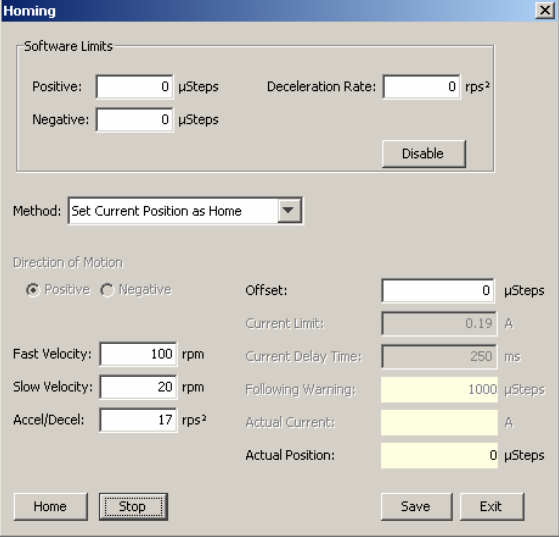
2. Select the following homing parameters:
Homing – parameters
| Parameter | Description |
|---|---|
| Software limits: Positive / Negative | Position of user-defined travel limits that take effect after homing operation. |
| Software limits: Deceleration Rate | Deceleration rate used to stop a motor when approaching a software limit. |
| Software limits: Disable | Disables the use of software limits by setting both limits to zero. |
| Method | Homing method. See Homing Methods. |
| Direction of Motion | Initial direction of motion for the homing method (Pos or Neg). |
| Fast Velocity | The velocity used to find a limit or home switch. Also used when moving to an offset position, or a resolver or Servo Tube index position. |
| Slow Velocity | The velocity used to find a switch edge, incremental or analog encoder index pulse, or hard stop. |
| Accel/Decel | The acceleration and deceleration rate used during homing. |
| Offset | Execute a move of this distance after the reference is found. Set actual position to 0 and call the new position home. |
| Current Limit | Hard stop home is reached when the amplifier outputs the homing Current Limit continuously for the time specified in the Delay Time. |
| Current Delay Time | Hard stop home is reached when the amplifier outputs the homing Current Limit continuously for the time specified in the Delay Time. |
| Following Warning | Shows the programmed following warning level. |
| Actual Current | Shows actual current being applied to windings during homing. |
| Actual Position | Shows the actual position of the axis. |
3. Optionally click Home to begin a homing sequence. To stop immediately, click Stop.
4. Click Save to save the settings to flash memory. Click Exit to close the screen
Słowa kluczowe
bazowanie, homing, limity programowe, metoda bazowania, prędkość bazowania, offset, home switch
No comments to display
No comments to display