
17. Virtual Amplifier
Streszczenie: Wirtualny wzmacniacz: tworzenie wzmacniacza wirtualnego z szablonu .ccv lub z istniejącego pliku – do szkoleń i przygotowania danych silnika offline.
EN: Virtual amplifier: creating a virtual amplifier from a .ccv template or an existing file for training and offline setup.
Dotyczy: program CME 2 do konfiguracji i strojenia serwonapędów oraz napędów krokowych Copley Controls (m.in. Xenus, Accelnet, Stepnet, Accelus, Junus)
Źródło: dokumentacja producenta (Copley Controls CME 2 User Guide)
Virtual amplifiers can be used for training and for creating motor data files off line.
A new virtual amplifier can be created based on a virtual amplifier template file (.ccv). CME 2 includes a set of .ccv files representing Copley Controls amplifiers. Perform these steps to create a virtual amplifier:
1. Start CME 2
2. 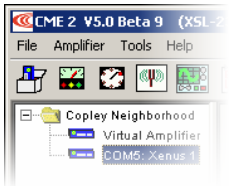
Choose Virtual Amplifier from the Copley Neighborhood tree to open the Open Virtual Amplifier screen:
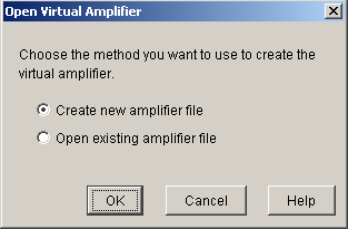
3. (To open a virtual amplifier from an existing amplifier file, skip to Step 4 now.) To create a new virtual amplifier file based on a virtual amplifier template file:
Select Create new amplifier.
When prompted, highlight the virtual amplifier template filename (.ccv) that represents the type of virtual amplifier you wish to create.
Click Open to open the file and the Basic Setup screen.
Motor and amplifier values may now be viewed, entered, and adjusted.
4. Alternately, to open an existing amplifier file:
Select Open existing amplifier file.
When prompted, highlight the name of the file you wish to open.
Click Open.
Motor and amplifier values may now be viewed, entered, and adjusted.
Słowa kluczowe
wirtualny wzmacniacz, .ccv, szablon, szkolenie, praca offline, Copley Neighborhood
No comments to display
No comments to display